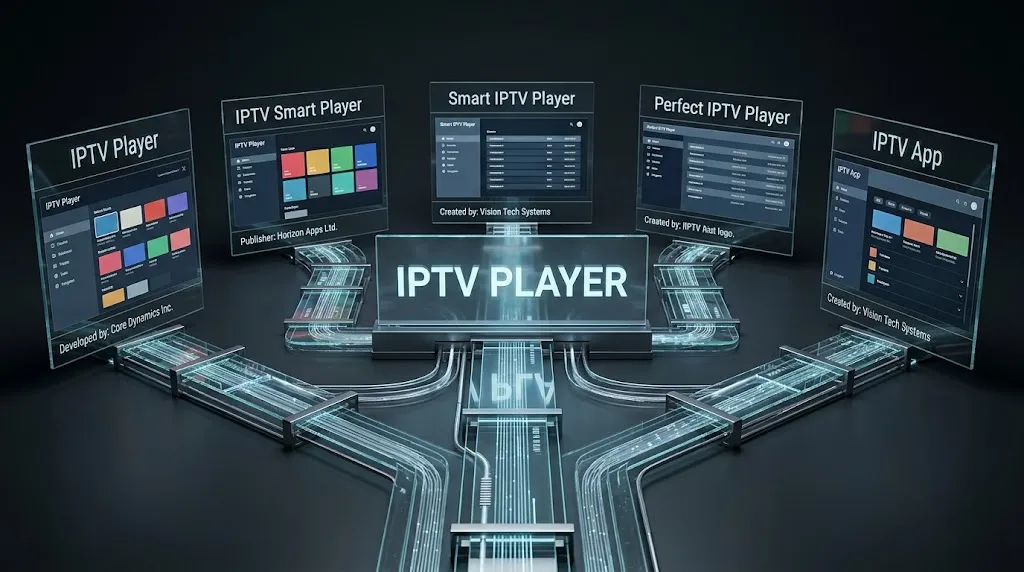

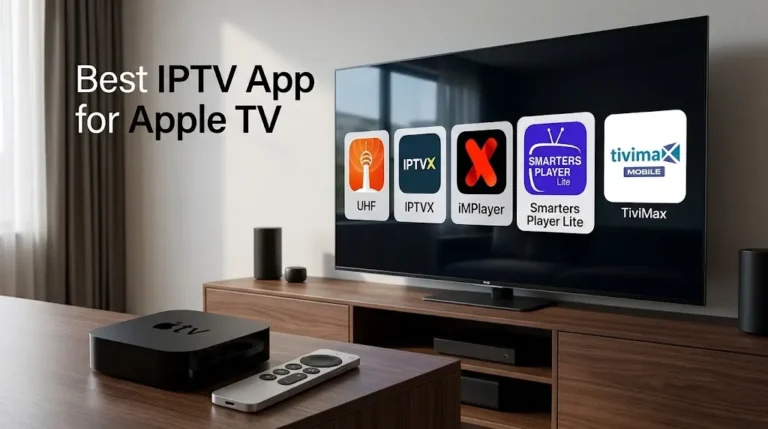
Search an app store from a Baltimore rowhouse or a Silver Spring apartment and IPTV apps arrive as a wall of near-identical names: IPTV Player, IPTV Smart Player, Smart IPTV Player, Perfect IPTV Player. Different publishers, different products, and nothing in the names to tell them apart. This page maps the whole category: what these apps do, which families of devices they run on, and how to check a listing before installing anything. If the technology itself is new to you, start with how IPTV works in Maryland, because the app is only the part of that chain you can see.
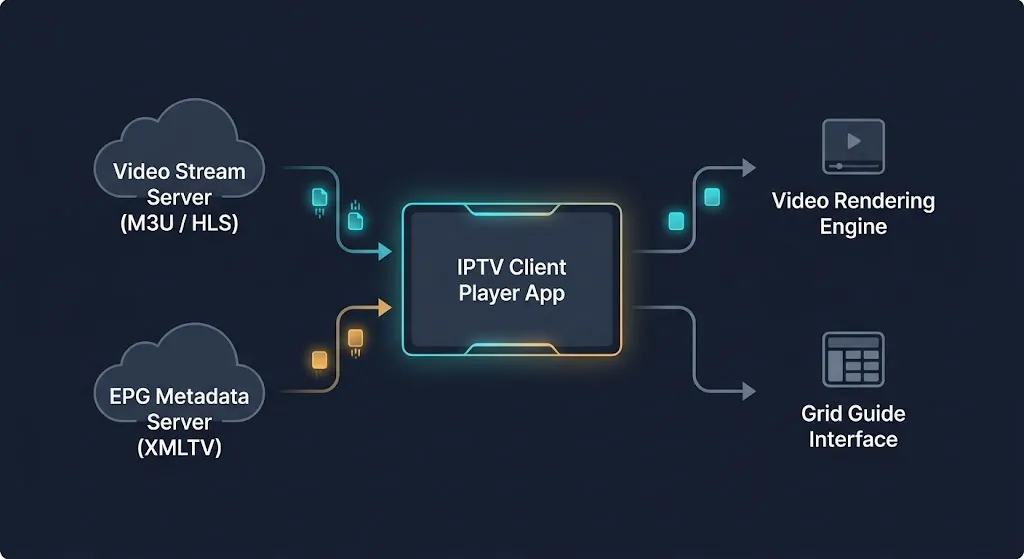
IPTV apps are players. A player reads a playlist or login that you supply and displays what that source sends; it does not normally include channels of its own. IPTV players appear across Android TV, Fire TV, Samsung and LG televisions, Apple devices and computers, but names repeat across unrelated publishers. The publisher line and declared platforms on a listing identify an app, not its name.
What IPTV Apps Are
An IPTV app is software that plays television-style streams delivered over an internet connection. That definition is broad enough to cover several different kinds of software, and the differences between them explain most of the confusion around the category.
The Player, the Source, and the Guide
The most important fact on this page is not our claim. Developers write it into their own listings.
The TiviMate listing describes the app as a media player only that provides no content. It states that any paid upgrade adds application features only: no channels, streams, or media. The XCIPTV PLAYER listing says the app does not supply or include any media and that users must provide their own content. The listing text for OTT Navigator IPTV says the app does not provide any video by itself.
Three unrelated developers, the same disclaimer. The app is the interface; what you watch comes from a source you add, usually a playlist or a login. That separation also means stream problems cannot automatically be attributed to the player. How much headroom a Maryland connection needs is a separate question from which app you use.
The on-screen program guide is a third piece again. The Kodi wiki’s page for its IPTV add-on documents the arrangement directly: an M3U playlist supplies the live channels, and a separate XMLTV file supplies the guide. Because the guide can come from a different address than the video, it can be blank or wrong while every channel plays normally.
The Input Formats a Player Accepts
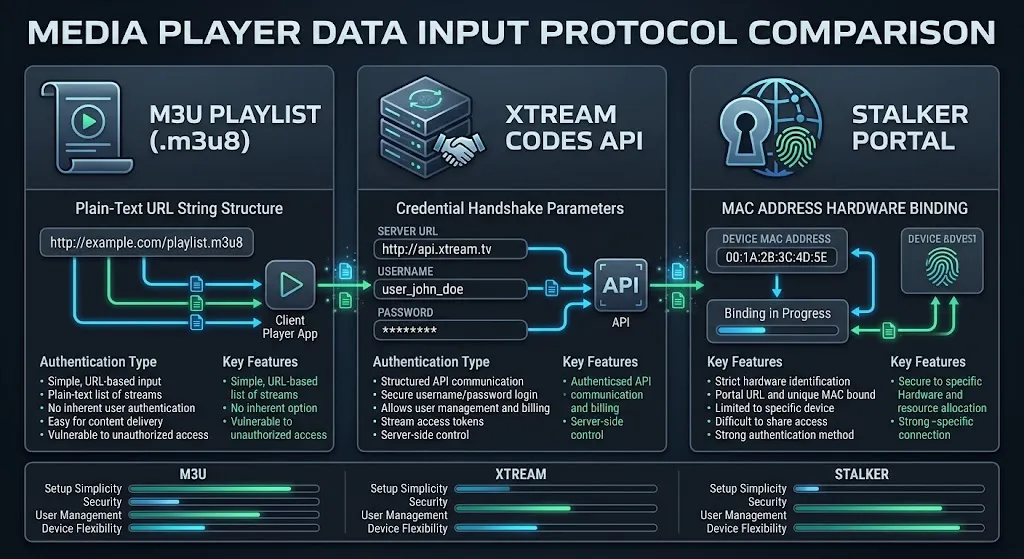
Players connect to sources in different ways, and listings name the formats they accept. An M3U playlist is a file or URL that lists channels and their stream addresses. Xtream Codes-compatible logins and Stalker Portal connections are two other formats that appear on listings.
Support varies by app. TiviMate’s listing names M3U, Xtream Codes and Stalker Portal. XCIPTV PLAYER’s listing names Xtream Codes-compatible APIs, EZServer and M3U URLs. A player that does not accept the format your source uses cannot work with that source, whatever else it offers. That makes the format line on a listing more important than most feature lists.
Dedicated Players, General Media Players, and Media Centers
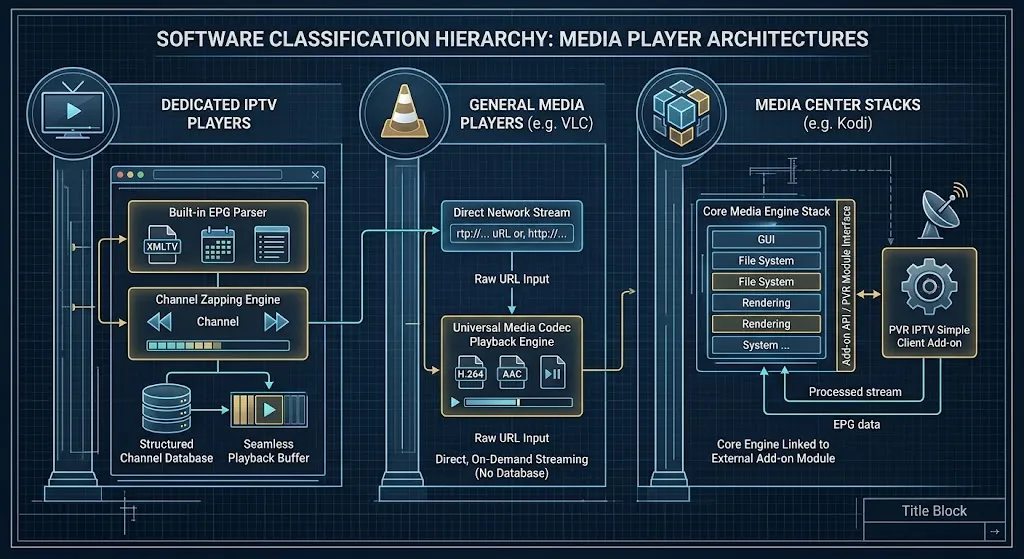
Three kinds of software turn up under the same search, and they behave differently.
A dedicated IPTV player is built around a channel list and a program guide. TiviMate’s listing, for example, describes a guide grid, favorites, catch-up and recording, all features that assume live channels.
A general media player opens whatever you point it at. VideoLAN, the non-profit organization behind VLC, describes VLC as a cross-platform player for most multimedia files and various streaming protocols. It can open a stream address, but it offers no IPTV-specific guide or channel browsing.
A media center is a different category again. Kodi often appears in lists of IPTV apps. According to the Kodi wiki, though, getting an IPTV signal into Kodi takes either separate backend software or a PVR client add-on. The add-on it documents for receiving IPTV directly, PVR IPTV Simple Client, is installed from Kodi’s own add-on browser after Kodi itself. Someone who installs Kodi expecting a ready-made IPTV player finds nothing resembling one. The software is not broken; the add-on is the part that does the IPTV work.
Apps From Your Internet Company Are Something Else
In Maryland, the phrase “IPTV app” is also used for the TV apps of Comcast Xfinity and Verizon Fios, and those work on a different principle.
Xfinity’s Stream app overview says customers sign in with an Xfinity ID and that watching the full TV subscription requires being on the Xfinity WiFi network. Verizon’s Fios TV Home app documentation ties the app to three conditions: an eligible Fios TV and Internet package, in-home use, and at least one installed Verizon Media Server or Fios TV One box.
Neither is a general player you add a source to. Each is a window onto a TV service the household already pays for. The comparison that matters there is IPTV compared with cable in Maryland, not one player against another.
Why So Many IPTV Apps Share the Same Name
The pattern is visible in the search results themselves. A search for IPTV apps returns listings called IPTV Player, IPTV Smart Player, Smart IPTV Player, Perfect IPTV Player and IPTV App, from different publishers with different feature sets.
One Google Play listing reviewed for this page, published as IPTV Smart Player, describes itself using the name “IPTV Smarters” in its own text while being a separate listing. A recommendation that names “IPTV Smarters” alone therefore does not settle which product is meant. People search for exactly this: “which is the real IPTV app?” is one of the questions that accompanies this topic in search.
None of that shows any particular app is illegitimate. It shows the name is not an identifier. Two apps with nearly the same name can be unrelated products, and nothing said about one applies to the other.
 Two listings can share a name. The publisher line is what tells them apart.
Where IPTV Apps Run
IPTV players appear across the five device families below, and each installs software differently. Installation steps and device choice are separate subjects; this section covers what each family is and what to know first.
[Platform map block — see iptv-apps-platform-map.html]
Android TV and Google TV
Android TV and Google TV devices install Android packages, mostly from Google Play, and several of the players documented on this page list Android TV. TiviMate’s listing states that it is designed for Android TV and remote-control navigation and is not optimized for touch devices such as phones or tablets. That is a design statement, not a claim it cannot run elsewhere. XCIPTV PLAYER’s listing names Android TV, Android phones and Android tablets.
Fire TV: Fire OS and Vega OS
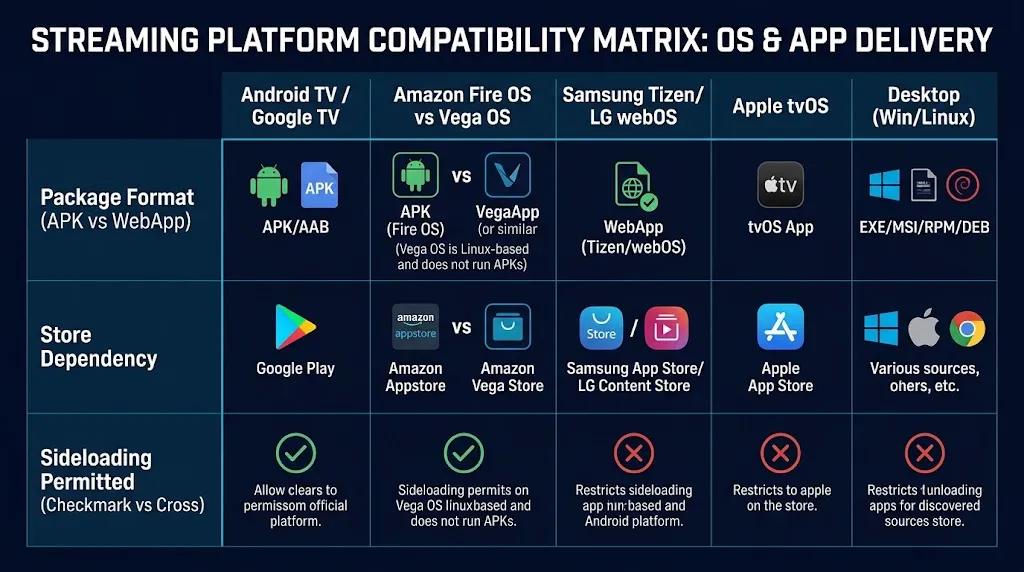
Fire TV is now two platforms under one brand. Older and current Fire OS devices are Android-based; newer sticks run Amazon’s Vega OS, which is not. AFTVnews, which covers the platform closely, reports that two different devices are sold as the Fire TV Stick HD. The 2024 model runs Fire OS and supports sideloading; the 2026 model runs Vega OS and does not. The same outlet reports that Amazon’s developer page states all future Fire TV Sticks will run on Vega. Before relying on any Fire TV app advice, check which operating system the specific device runs.
Samsung and LG Smart TVs
Samsung and LG televisions run their own operating systems, Tizen and webOS, and neither is Android. On Samsung’s developer forum, a Samsung Developer Relations reply states that apps are installed with Tizen Studio rather than Android tools, and that someone trying to install an Android TV app is out of luck. LG’s developer documentation describes webOS TV apps as web apps, either packaged or hosted.
In practice, a player for these televisions has to be built for that platform and listed in that television’s own store. An Android player’s listing that does not mention Tizen or webOS tells you nothing about them either way. Treat support as unconfirmed until the publisher states it.
Typing long addresses with a TV remote is slow, so some TV apps link through a web page instead. Xfinity documents this for its own app on Samsung and LG televisions: the TV shows a six-digit code, and you enter it at an Xfinity web address on a phone or laptop. Where any app asks you to register a TV through a website, check whose website it is before entering anything.
iPhone, iPad, and Apple TV
Apple devices install apps from the App Store, and IPTV players appear there as ordinary listings. One App Store listing for Perfect IPTV declares support for iPhone, iPad and Apple TV. It states that it does not provide, host, distribute or include any TV channels, playlists or media. VideoLAN also offers VLC for iOS and Apple TV.
Computers: Windows, Mac, and Linux
On a computer, the general media player route is the most widely documented. VideoLAN lists VLC for Windows, macOS and several Linux distributions. The Microsoft Store also carries dedicated players; one, MyIPTV Player, states in its listing that no IPTV channels or streaming URLs are provided. The Kodi wiki’s installation notes for the IPTV add-on include Linux, so Kodi with that add-on is another documented route on a computer.
How to Check an IPTV App Before You Install It
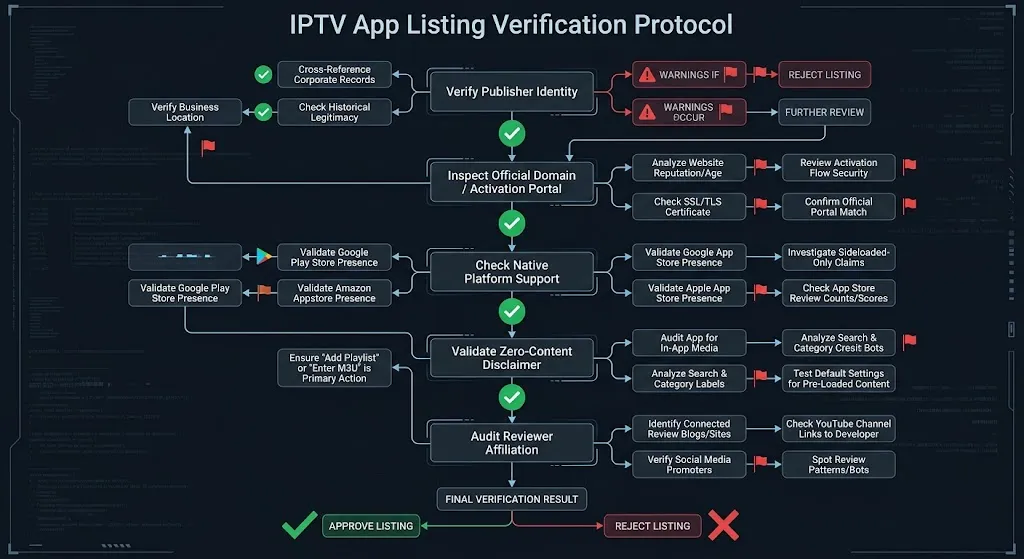
Five checks, all done on the listing and before installing anything. They apply to every platform above.
Read the Publisher, Not the Name
Every store listing names a publisher, and that line is the identifier. XCIPTV PLAYER’s publisher is OTTRUN, whose own site repeats the same content disclaimer as the listing. When someone recommends an app, the useful question is which publisher’s version they mean. If two listings share a name and differ in publisher, they are different products.
Check Whether There Is One Clear Official Home
Some players have a single, unambiguous home. VideoLAN publishes VLC, and tivimate.com describes TiviMate as a media player to which you add your own playlists. Other names return several sites that each present themselves as the place to go. IBO Player, a name that setup guides for Samsung and LG televisions frequently point to, is the clearest case found during research for this page: at least five different domains offered activation pages or device licenses under that name or a close variant, and one of them, activation.iboplayer.com, identifies its operator as IBO DEV Ltd. That proves nothing against any of them, but it means the name alone cannot tell you where to download, where to pay for activation, or where to enter your TV’s details.
Check the Platform on the Listing Itself
Store listings declare which devices they are built for, and that line is worth reading before anything else. If your platform is not on the listing, do not assume it is supported, and do not assume it is excluded. Look for a platform statement from the publisher before installing.
Check What the Description Says About Content
Each of the four player listings quoted above states that the app supplies no channels. Read the whole description, though. One Google Play player listing reviewed for this page states that it contains no pre-loaded playlists or channels, then advertises a separate content service further down the same text. A listing that sells content is describing something other than a player. This site does not name, rank or recommend subscription services, for the reasons set out in our DMCA disclaimer. Whether a particular source is licensed is a separate legal question.
Check Who Is Making the Recommendation
Several of the ranked app guides in the results for this search are published by businesses that sell streaming hardware or subscriptions. That does not make their information wrong, but it changes what kind of source you are reading. Before relying on a ranked list, check whether its publisher sells a product it recommends or uses affiliate links. Then compare the claim with the app’s own listing. The point is not to reject recommendations; it is to separate a publisher’s opinion from what the developer actually states.
What the Listings Declare
| App or software | Publisher or project | Declared platforms | Input formats | Stated limits | Source |
|---|---|---|---|---|---|
| TiviMate IPTV Player | Armobsoft FZE | Designed for Android TV and remote navigation | M3U, Xtream Codes, Stalker Portal | Not optimized for touch devices; paid upgrade adds app features only, no content | Google Play, tivimate.com |
| XCIPTV PLAYER | OTTRUN | Android TV, Android phones, Android tablets | Xtream Codes-compatible API, EZServer, M3U URL | States it supplies no media or content | Google Play, ottrun.com |
| OTT Navigator IPTV | SIA Scillarium Studio | Phone, tablet, TV, TV box | A playlist or other source the user supplies | States it provides no video by itself | Listing text |
| Perfect IPTV Player | Check the developer line on the listing | iPhone, iPad, Apple TV | M3U, XSPF, Xtream Codes; XMLTV guide | States it provides no channels, playlists or media | Apple App Store |
| MyIPTV Player | Check the developer line on the listing | Windows | Xtream Codes, M3U | States no channels or streaming URLs are provided | Microsoft Store |
| VLC media player | VideoLAN | Windows, macOS, Linux, Android, iOS, Apple TV | Most media files and various streaming protocols | General media player, not a dedicated IPTV player | videolan.org |
| PVR IPTV Simple Client (Kodi add-on) | Kodi PVR add-on project | Runs inside Kodi | M3U for channels, XMLTV for the guide | Requires Kodi; Kodi alone is not an IPTV player | Kodi wiki |
| “IPTV Smarters” | Varies by listing | Varies by listing | Varies by listing | The name appears in listings from different publishers | Google Play |
This table is not a ranking and contains no recommendation. Each row records what a specific listing or project documents, and the last column says where it came from. Where a detail could not be established, the table says so rather than guessing.
Conclusion
IPTV apps are the visible end of a longer chain: the player displays, the source supplies, and the guide arrives separately. They appear across the device families covered on this page, but each installs software its own way, and Fire TV is now two platforms under one name. Because names repeat across unrelated publishers, the publisher line, the declared platforms and the content statement on a listing tell you far more than the name ever will.
For the wider picture of the technology these apps display, return to how IPTV works in Maryland. Every claim on this page is checked against a primary source before publication, as described on our About page. If a listing has changed since this page was reviewed, let us know and it will be corrected.
Sources
- Google Play — TiviMate IPTV Player — https://play.google.com/store/apps/details?id=ar.tvplayer.tv (accessed September 2026)
- TiviMate — https://tivimate.com/ (accessed September 2026)
- Google Play — XCIPTV PLAYER — https://play.google.com/store/apps/details?id=com.nathnetwork.xciptv (accessed September 2026)
- OTTRUN — https://ottrun.com/ (accessed September 2026)
- IBO Player activation page — https://activation.iboplayer.com/ (accessed September 2026)
- Apple App Store — Perfect IPTV Player — https://apps.apple.com/us/app/perfect-iptv-player/id1516946830 (accessed September 2026)
- Microsoft Store — MyIPTV Player — https://apps.microsoft.com/detail/9pjj2nmbf0tr?hl=en-US&gl=US (accessed September 2026)
- VideoLAN — VLC media player — https://videolan.org/vlc/ (accessed September 2026)
- Official Kodi Wiki — Add-on: PVR IPTV Simple Client — https://kodi.wiki/view/Add-on:PVR_IPTV_Simple_Client (accessed September 2026)
- LG webOS TV Developer — Web App Types — https://webostv.developer.lge.com/develop/getting-started/web-app-types (accessed September 2026)
- Xfinity — What’s the Xfinity Stream app? — https://www.xfinity.com/support/articles/tv-app-overview (accessed September 2026)
- Xfinity — Activate the Xfinity Stream app on LG, Samsung, and Xumo Smart TVs — https://www.xfinity.com/support/articles/activating-xfinity-stream-smarttvs (accessed September 2026)
- Verizon — Fios TV Home App FAQs — https://www.verizon.com/support/residential/tv/streaming-device-connection/fios-tv-home-app/ (accessed September 2026)
- AFTVnews — Fire TVs that don’t support sideloading due to Vega OS — https://www.aftvnews.com/these-are-the-fire-tvs-that-dont-support-sideloading-or-downloader-due-to-vega-os-replacing-fire-os/ (accessed September 2026)
[…] for it. Developers state their supported platforms on their store listings, as our guide to IPTV apps explains, and those statements differ […]
[…] Fire TV does not come with IPTV. You supply a source, and a player app opens it. The player is a separate piece of software with its own developer, so the first question about any Fire TV is simple: can it install the […]
[…] box. Like any streaming device, it needs a player app to open the source you supply, and the player is a separate piece of software with its own developer. What differs between boxes is everything around that player: who tested the […]